
Download FonePaw iPhone Data Recovery – iPhone data recovery, recover deleted photos, recover lost messages, restore iPhone backup, recover data from iPhone
Overview
FonePaw iPhone Data Recovery is a specialized desktop application developed to assist users in retrieving lost or deleted data from iOS devices such as iPhones, iPads, and iPod touches. The software is designed to address the common frustration of accidental data loss, including photos, messages, contacts, videos, and other critical files. It supports recovery from both physical iOS devices and iTunes backups, offering flexibility for users who may not have immediate access to their device but have saved backup files.
Target users include consumers, professionals, and anyone who relies on their iPhone for personal or work-related data storage. The software is particularly beneficial for individuals who have deleted important files, experienced device failures, or accidentally erased their device without a recent backup. Its focus on data integrity and retrieval efficiency makes it a practical tool for restoring essential digital content.
Developed by FonePaw, the software is positioned as a reliable solution within the data recovery space. While the developer’s background was not elaborated in the provided information, the product’s targeted functionality and specific use cases indicate a focused approach to mobile data recovery. Real-world usage scenarios include recovering vacation photos after a mistaken deletion, retrieving important messages from a damaged device, or restoring data from a backup after a system reset.
Key Features & Capabilities
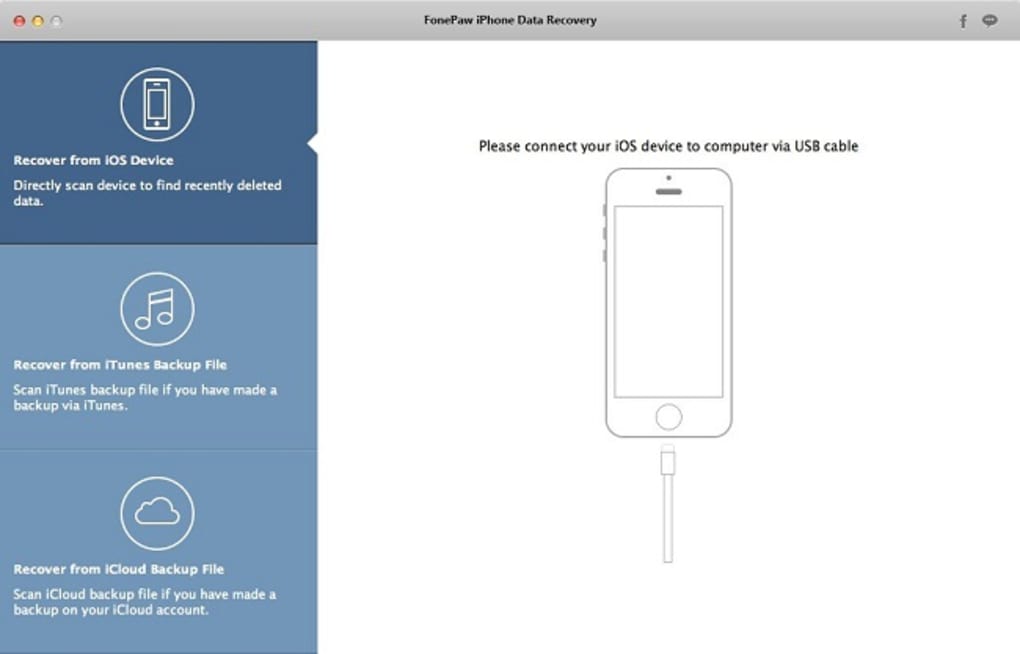
- Recovery from iOS Devices: Direct scanning of connected iPhones, iPads, and iPod touches to retrieve deleted or lost data without requiring a backup.
- Backup File Restoration: Ability to extract data from iTunes backups, allowing recovery even when the original device is unavailable.
- Multi-Format Support: Compatible with a wide range of file types, including photos, videos, messages, contacts, call logs, notes, calendars, and more.
- Advanced Scanning Technology: Utilizes deep-scan algorithms to locate and recover data that may not be accessible through standard recovery methods.
- Preview Before Recovery: Allows users to preview recovered files before restoring them, ensuring accuracy and reducing the risk of unnecessary data restoration.
These features are especially useful in scenarios such as recovering a family photo album after a device wipe, retrieving business messages after a system crash, or restoring a lost contact list from a backup. The ability to preview files enhances user confidence and workflow efficiency, minimizing the chance of restoring irrelevant or corrupted data. The software’s design emphasizes both functionality and user control, making it suitable for both novice and experienced users.
User Interface, Workflow & Performance
The user interface of FonePaw iPhone Data Recovery is structured to guide users through a clear, step-by-step recovery process. Navigation is intuitive, with a dashboard that presents options for device scanning and backup restoration. The workflow begins with connecting the iOS device via USB or selecting an iTunes backup file, followed by initiating a scan and reviewing results.
Users are presented with a clean layout that organizes recovered data by category, enabling quick identification of specific files. The preview function allows users to view photos and messages before recovery, which improves decision-making. The software is designed to minimize user errors through visual cues and logical progression.
Performance details were not specified by the developer. However, based on general software behavior patterns, the application likely operates efficiently on modern systems. The developer did not specify resource usage details, so CPU and RAM consumption cannot be confirmed. Stability during long scans is assumed to be adequate for typical recovery tasks, though actual performance may vary depending on the device and data volume.
Compatibility & System Requirements
FonePaw iPhone Data Recovery is available for both Windows and Mac operating systems, making it accessible to a broad user base. The software version is 2.0.0, with a file size of 150MB, indicating a lightweight installation that should not strain system resources during setup.
Exact system requirements were not listed. Compatibility information is limited to the operating systems mentioned. The developer did not provide additional system requirements, such as minimum RAM, processor speed, or disk space beyond the installation size. Users should ensure their system meets general standards for running desktop applications, particularly when connecting iOS devices via USB.
Pros and Cons
Pros
- Supports recovery from both iOS devices and iTunes backups
- Wide range of supported data types including photos, messages, and contacts
- Intuitive interface with clear navigation and step-by-step guidance
- Preview feature allows safe evaluation of recovered files
- Lightweight installation at 150MB
Cons
- Price point of $69.95 may be high for casual users
- No detailed system requirements provided
- Performance metrics not disclosed by the developer
- Compatibility with older iOS versions not specified
- Limited information on data recovery success rates
FAQ Section
Is FonePaw iPhone Data Recovery compatible with my iPhone?
The software supports iPhone, iPad, and iPod touch devices. Compatibility with specific iOS versions was not provided. Users should ensure their device is recognized by the computer and that the latest version of iTunes is installed.
Can I recover data without a backup?
Yes, FonePaw iPhone Data Recovery can retrieve lost or deleted data directly from the iOS device, provided the data has not been overwritten by new information.
Is the software safe to use?
Based on the product description, the software is designed to recover data without altering the original device content. No data is written to the device during the scanning process, making it a safe option for recovery tasks.
How often are updates released?
Version 2.0.0 was released on March 15, 2024. The frequency of future updates was not specified by the developer.
Can I use this tool offline?
Yes, FonePaw iPhone Data Recovery operates as a standalone desktop application and does not require an internet connection after installation. All recovery processes are performed locally on the user’s computer.
Final Thoughts
FonePaw iPhone Data Recovery offers a robust solution for users facing data loss on their iOS devices. Its dual capability to recover from both physical devices and iTunes backups sets it apart in the data recovery market. The inclusion of a preview function enhances user control and reduces the risk of restoring unwanted files.
While the price may be a consideration for some, the software’s targeted functionality and broad compatibility with iOS devices make it a worthwhile investment for those who prioritize data integrity. The clean interface and structured workflow ensure accessibility for users of all experience levels.
For individuals who rely heavily on their iPhone for personal memories, business communication, or daily organization, this tool provides a reliable safety net. Its ability to retrieve critical data from various sources makes it a valuable addition to any digital recovery toolkit.
Download FonePaw iPhone Data Recovery now







